How to Stop Claude from Ghostwriting Your Git History (And Fix It If It Already Did)
If you’ve been using AI coding assistants lately, you’ve probably experienced that moment of magic where the AI writes a perfect block of code, structures your boilerplate, and even writes a neat commit message for you.
But recently, I looked at my repository’s commit history and noticed a highly annoying stowaway:
Co-Authored-By: Claude <noreply@anthropic.com>

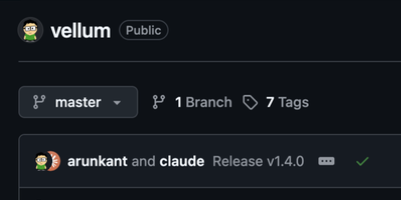
Suddenly, my clean git history was littered with co-author tags. While I appreciate the help, I don’t need my version control looking like a joint venture with a large language model. Not only does it clutter up the git log, it also surfaces in the GitHub UI on every commit:
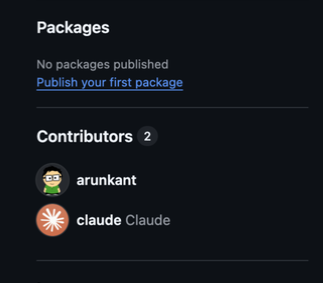
And worse — it messes with repository contributor stats, adding Claude to the contributors list as if it were a teammate:
I wanted them gone. But if you know anything about Git, you know that changing old commit messages isn’t as simple as hitting “Edit.”
Here is how I navigated the rabbit hole of Git history rewriting, what failed, and the ultimate solution that finally cleaned up my repo.
The “Almost” Solutions
My first instinct was to use a bash script. A quick search usually points to git filter-branch. I threw a sed command at it, only to be greeted by a massive Git warning telling me that filter-branch is deprecated, dangerous, and known to mangle histories. No thanks.
Next, I tried an interactive rebase:
git rebase --root --exec "..."
This actually worked beautifully for my main branch! But it had a fatal flaw: rebase is a single-branch tool. When the rebase finished, my main branch was clean, but my other branches were untouched. Worse, all my Git tags were left behind, still pointing to the old, contaminated commit hashes.
I needed a way to nuke these messages across every branch and every tag simultaneously.
The Ultimate Fix: git filter-repo
Git’s official recommendation for this kind of heavy lifting is a tool called git filter-repo. It is blisteringly fast, handles tags and branches automatically, and is designed specifically to not corrupt your repo.
Here is the exact step-by-step process to scrub Claude (or any other AI) from your entire repository.
Step 1: Install git filter-repo
It’s a Python-based tool, so installation is incredibly easy.
If you’re on a Mac:
brew install git-filter-repo
Or via Python/pip (works anywhere):
pip install git-filter-repo
Step 2: The Magic One-Liner
Before doing this, ensure you have a clean working directory.
git filter-repo allows you to pass a small Python callback directly in the terminal to modify commit messages on the fly. Open your terminal in the root of your project and run this:
git filter-repo --message-callback '
import re
return re.sub(b"(?m)^.*Co-Authored.*Claude.*\n?", b"", message)
'
What is this doing? It iterates through every single commit, branch, and tag in your repository. It looks for any line containing “Co-Authored” and “Claude” and replaces it with nothing. Because it rewrites the commits, your tags are automatically updated to point to the new, clean commit hashes.
Step 3: Re-link and Force Push
Because rewriting history changes all your commit hashes, git filter-repo has a built-in safety mechanism: it automatically removes your remote tracking branches (like origin) so you don’t accidentally push before verifying.
Once you’ve checked your git log and confirmed Claude is gone, re-add your remote:
git remote add origin https://github.com/your-username/your-repo.git
Finally, push your new, clean history back to your remote. You must push branches and tags explicitly:
git push origin --force --all
git push origin --force --tags
Preventing Future Attributions
Cleaning up history is only half the battle. If you don’t change anything, Claude will happily start adding Co-Authored-By lines back on your very next commit. The fix is a one-time tweak to your Claude Code settings.
Open (or create) ~/.claude/settings.json and set the attribution fields to empty strings:
{
  "attribution": {
    "commit": "",
    "pr": ""
  }
}
This tells Claude Code to skip the commit trailer and the PR description footer that normally credit it as a co-author. Save the file and you’re done — no restart needed. Every future commit and PR Claude creates on your behalf will be free of attribution noise.
A Quick Warning on Rewriting History
Rewriting Git history is the nuclear option. Because the commit hashes change, anyone else working on this repository with you will have a broken local environment. If you are working on a solo project, fire away. If you are working on a team, make sure everyone pushes their changes, run this script, and then have your teammates delete their local folders and re-clone the repository from scratch.
AI assistants are amazing tools, but our commit history belongs to us. Hopefully, this saves you the headache of dealing with unwanted AI co-authors!